
Invitation Maker-Card Creator
Battery Stats SaverEvents
4.852.00 Reviews
- Version
- 2.1.3
- Installs
- 1.00M
- Age Rating
- Everyone
Screenshots
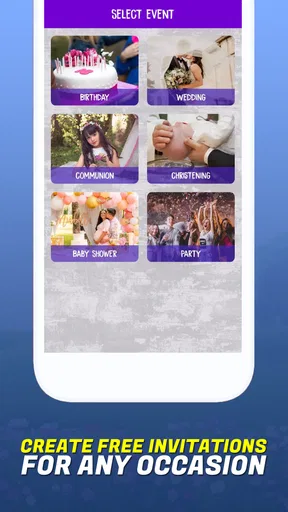
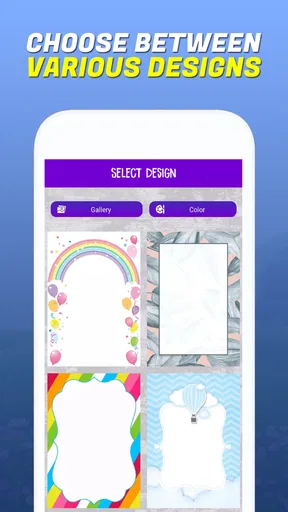
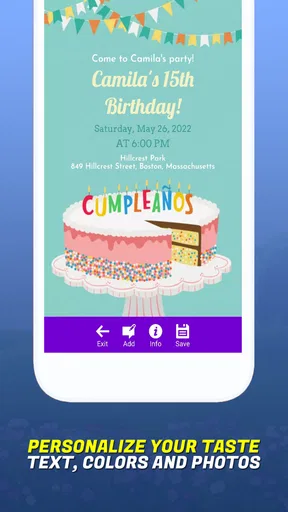
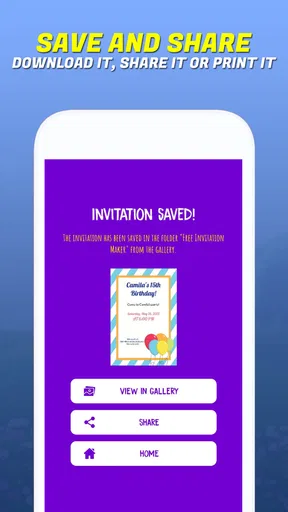
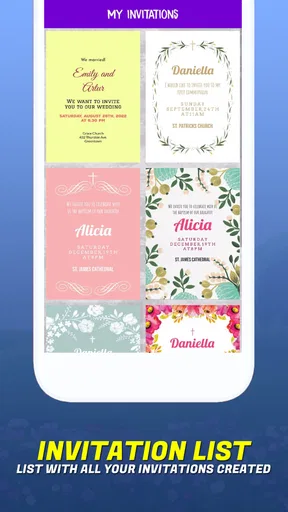
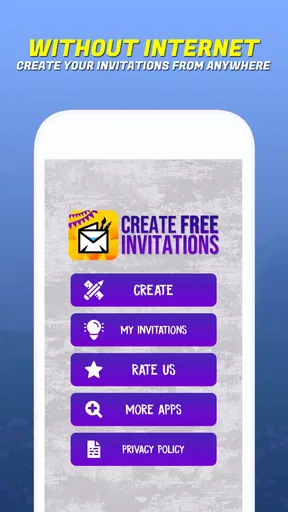
Our Review of Invitation Maker-Card Creator
 Analysis by Appyee
When I choose an invitation app, I care about more than how polished a card can look. I also want to know whether I can make sensible choices while preparing something personal, such as a wedding announcement or a child’s birthday invite. Invitation Maker-Card Creator is a free events app from Battery Stats Saver, and its focus is clear: helping people create invitation designs without needing a full desktop design workflow. It has a 4.8 average from around 10 thousand ratings and more than a million installs, which suggests that this simple, practical job resonates with a lot of users.
A creative tool, with ordinary privacy questions
Invitations often contain details people would not post publicly: a home address, a child’s name, a date, or a private venue. That makes it worth thinking about the route from draft to final card, not just the colors and fonts. I would treat the design as a piece of personal information and decide what belongs on it before sharing. A design can be attractive without including more details than guests need.
I also wouldn’t assume that a particular permission, account option, or privacy control exists unless it is visible in the app itself. When I try a creative app, I look at the prompts it presents and make choices based on what I actually see. If a permission request appears, I consider whether it makes sense for the action I’m taking; if I’m only arranging text and graphics, I pause before granting access that seems unrelated. That cautious habit is useful with any invitation creator.
Keep control of the details you share
My practical approach is to make a low-risk test design first, using placeholder wording rather than real names, addresses, or phone numbers. That lets me get a feel for the editing process before entering information I would not want casually exposed. When the design is ready, I check the spelling, event date, location, and any RSVP instructions carefully; these are easy details to overlook when attention is on the visual layout.
Sharing is a separate decision from creating. I would review the finished card and choose the intended recipients deliberately, especially if I’m sending it through a social channel where an audience may be broader than a guest list. For a private gathering, a direct message to each household can be more appropriate than a public post. The app’s creative purpose is useful, but the safest sharing choice still depends on the event and the audience.
Getting Started with Ease
First things first, downloading and setting up Invitation Maker-Card Creator is as straightforward as it gets. Available on both Android and iOS, it’s just a tap away on the App Store or Google Play. Once installed, the app greets you with a clean, user-friendly interface that’s a breeze to navigate. Even if tech isn’t your forte, you’ll find yourself whipping up a card in no time.
One of the best parts? You don’t need any prior design experience. The app is packed with intuitive tools and templates that guide you through the process. Whether you’re crafting invitations for weddings, birthdays, or a casual get-together, there’s something here for every occasion.
Diving into the Features
Now, let’s talk about what makes this app truly special. The variety of templates is impressive. You can choose from a plethora of themes and styles, ensuring your invitation perfectly matches the vibe of your event. And if you’re feeling creative, the app allows for plenty of customization.
Customization is where the app truly shines. You can tweak everything from the text and fonts to the color schemes and images. Want to add a personal touch? Upload your own photos or choose from the app’s vast library of stock images. The drag-and-drop functionality makes it all incredibly easy. You’ll feel like a pro designer in no time.
Choosing a design that works in real life
The best template is not always the most decorative one. I find it helpful to start with the event’s practical purpose: guests should be able to spot the occasion, date, and key instructions quickly on a phone screen. A restrained layout can be easier to read than a crowded design, particularly when a photo, several lines of text, and decorative elements compete for attention. Before committing, I would zoom out and check whether the essential details remain legible at a glance.
For a family birthday, for example, I might pick a bright theme, add one personal image, and keep the wording short. For a wedding, I’d be more selective about colors and type styles, then check that the invitation still feels clear rather than overworked. Using a photo can add warmth, but it also makes the image itself part of what you are sharing. If that feels too personal for a broad guest list, a design based on color and text may be the better trade-off.
One useful workflow is to settle the wording before spending time adjusting the appearance. I write down the essential information first, then fit it into the chosen design and edit the layout around it. This avoids polishing a card only to discover that the venue directions or RSVP note do not fit comfortably. I also keep a separate copy of the final wording, so I can reuse accurate details in a message if a guest asks for clarification.
Sharing and Printing Made Simple
Once you’ve created your masterpiece, sharing it is a piece of cake. You can send your invites directly via email, text, or social media. If you’re old-school and prefer physical copies, the app supports high-quality printing too. Just save your design and print it out. It’s that simple!
And let’s not forget about the app’s fantastic integration capabilities. Whether you’re syncing with your contacts or connecting with your calendar, Invitation Maker-Card Creator ensures everything is seamless and stress-free.
Picking the right delivery method
Digital invitations are convenient when plans may change or guests are spread across different places, but a printed card can make more sense for a formal occasion or for relatives who prefer something they can keep. I would decide on the delivery method before finishing the design, because a layout that looks balanced on a screen may need a different treatment on paper. If printing matters, I’d check the final saved design carefully and consider a single test print before making copies for everyone.
For a casual event, sending a finished card by text may be the fastest route. For a larger gathering, I’d make a simple recipient checklist outside the design process, so nobody is missed and the invitation itself does not become a substitute for tracking replies. A card maker can help with presentation, but it is not the same thing as a guest-management system. That distinction matters if you need to monitor responses, dietary needs, or changing attendance.
Compared with using a general-purpose graphic editor, an invitation-focused app can make the first draft less intimidating because the starting point is already shaped around an event card. A blank canvas gives more freedom, but also asks you to make more design decisions. If you want a bespoke layout or detailed control over print production, a full design tool may be a better fit. If you mainly want a presentable invitation without learning a complex editor, this app’s template-led approach is the more approachable option.
Cost, versions, and who should take a closer look
The app is free to install, with in-app purchases ranging from $0.99 to $99.99 per item. I’d explore the available choices before building a design around any element that may require payment; that way, the final card is not a surprise exercise in replacing something you expected to use. The right value judgment depends on how often you make invitations and how much the paid options matter to your particular design. For a one-off event, a free route may be enough; frequent organizers may judge the available extras differently.
It is rated for Everyone and runs on Android 8.0 or later. Version 2.1.3 is the current version, so I’d check that my device meets the minimum before planning around it. The developer is Battery Stats Saver, a name that does not describe the invitation task, so I would make my decision based on the app’s actual experience and the choices shown during use rather than drawing conclusions from the name alone. It was released on May 4, 2020, and its strong average rating is encouraging, though ratings cannot tell me whether a particular template or workflow suits my needs.
This is most appealing if you regularly organize birthdays, seasonal get-togethers, or family celebrations and want a designed card without starting from a blank page. It is less suitable if you need a collaborative planning tool, advanced typography controls, detailed print-production settings, or a built-in way to manage guest replies. In those cases, I’d use a dedicated design or event-planning alternative and treat the invitation as only one part of the job.
Why You'll Love It
There are so many reasons to fall in love with this app. For starters, it saves you time. No need to spend hours fiddling with complicated design software. Plus, it’s cost-effective. Forget about hiring a designer or buying expensive software; this app does it all at a fraction of the price.
Plus, it’s just plain fun. Playing around with different designs and seeing your vision come to life is incredibly satisfying. Whether you’re planning a grand celebration or a small gathering, Invitation Maker-Card Creator has got your back.
A cautious verdict for personal invitations
My main reservation is that a polished card can make the whole process feel finished when the practical work is not. I still need to verify names, dates, addresses, and delivery choices myself, and I would not assume that a design app will handle replies or keep an event organized. There is also a real balancing act between personalization and privacy: a family photo may make an invitation feel special, but a simpler design can be wiser if the card will travel beyond a small circle.
If I were preparing a last-minute birthday invite, I’d use a template, enter only the details guests need, inspect the text at phone size, and send the result directly to the intended people. For a formal wedding or a print-heavy event, I’d allow extra time to compare the finished design on screen and paper, and I might choose a more specialized tool if exact production control mattered. Those small decisions make the app more useful without expecting it to do jobs it was not built for.
Wrapping Up
In a world where first impressions matter, having a stunning invitation sets the tone for your event. With Invitation Maker-Card Creator, you’re not just sending out invites; you’re making a statement. So, why not give it a go? Download it today and unleash your inner designer. Your friends and family will love the results!
For me, the strongest reason to try it is the straightforward path from choosing a style to making a card feel personal. I would still be deliberate about paid elements, personal details, and where the finished invitation goes, especially when children’s information or a private address is involved. If you want an accessible way to make event cards and are happy to handle guest tracking separately, it is a sensible place to start. If your priority is strict control over data practices, advanced design precision, or managing an event end to end, I would compare alternatives before relying on it.
Privacy and Permissions
See what permissions an app requests and how it handles your data.
- Photos/Media/Files
- read the contents of your USB storage, modify or delete the contents of your USB storage
- Storage
- read the contents of your USB storage, modify or delete the contents of your USB storage
- Wi-Fi connection information
- view Wi-Fi connections
- Other
- view network connections, full network access, control vibration, prevent device from sleeping, Google Play license check
Verdict
Strengths of Invitation Maker-Card Creator
- User-friendly interface for easy design.
- Wide variety of templates available.
- High-quality graphics and fonts.
- Customizable design elements.
- Social media sharing integrated.
Limitations of Invitation Maker-Card Creator
- Limited free features, in-app purchases.
- Occasional ads can be disruptive.
- No offline editing capability.
- Limited export formats.
- Requires account for full access.
Other Releases by Battery Stats Saver
View All
Photo Lock App - Hide Pictures
Personalization4.6

All Deleted Messages Recovery
Communication4.2

USB Screen Share - Phone to TV
Personalization3.8

Speak and Translate Languages
Communication4.7
Similar Picks in This Category
View All
Easy Quran Mp3 Audio Offline
Muslim Worldapp4.7

Invitation Maker: Cards & RSVP
Greetings Island4.9

StubHub - Live Event Tickets
StubHub4.3

Fever: Events & Tickets
Fever Labs4.7

Epic Freebie Games Radar
Arioch Pds - Apps & Games4.4

Invitation card Maker, Design
Splendid App Maker4.9
Frequently Asked Questions
What features does Invitation Maker-Card Creator offer?
Invitation Maker-Card Creator provides a range of features to design personalized invitations. Users can choose from various templates, customize text, and add stickers or images. The app supports high-quality printing and sharing options, making it ideal for events like weddings, birthdays, and more.
Is Invitation Maker-Card Creator free to use?
While Invitation Maker-Card Creator offers a free version with basic features, there are in-app purchases available. These purchases unlock premium templates, additional design elements, and remove ads, providing an enhanced user experience for those seeking more customization options.
How user-friendly is Invitation Maker-Card Creator for beginners?
The app is designed with an intuitive interface, making it accessible for beginners. It offers a step-by-step guide for creating invitations, and its drag-and-drop functionality allows users to easily customize their designs. Even those with no prior design experience will find it easy to use.
Can I use my own images in Invitation Maker-Card Creator?
Yes, Invitation Maker-Card Creator allows users to upload and incorporate their own images into invitations. This feature enables a more personalized design, allowing users to add personal photos or logos to match the theme of their event perfectly.
What formats does Invitation Maker-Card Creator support for saving and sharing?
The app supports multiple formats for saving and sharing your invitations, including JPEG, PNG, and PDF. This versatility ensures that users can easily print their invitations or share them digitally via email or social media platforms.
